
When someone speaks to you in a foreign language, it is hard to guide them clearly.
Both customers and staff can end up looking uneasyWith Cotoa Talk & Keep!
No more language
barriers.
Voice and captions in one 74-language operating catalog.
Every conversation becomes a record and meeting minutes.
β During the beta campaign through September 30, 2026, the first 15 accounts each day receive 5 free minutes every month (up to 10 minutes banked). During beta, registrations beyond the first-come quota receive 5 minutes once. Registrations from October 1, 2026 receive 2 minutes once. Slots are released daily at 7:00, 12:00 and 20:00 JST, 5 at a time.
No installation needed—just open in your browser / No credit card required / No monthly contract, no auto-billing
Do any of these challenges sound familiar?
You want to communicate, but you can’t get through. You want to ask, but you don’t understand.
Are language barriers holding up your work and conversations?
You have something important to say, but cannot express it well.
It can be frustrating for everyone involvedYou cannot catch what overseas team members are saying and struggle to keep up with the meeting.
More requests to repeat can easily interrupt the meetingOn phone or video calls, it is hard to get across what you want to say.
Misunderstandings and crossed wires can happen easilyWhat overseas guests say does not reach everyone at the venue.
Valuable content goes unheardAfter a meeting, it can be difficult to sort out what was decided.
Creating minutes, reports, and summaries also takes timeLanguage barriers increase not only the other person's uncertainty, but yours as well.
When there is an “I don’t understand,” conversations and work can easily come to a stop.
With Cotoa Talk & Keep!
Face-to-face conversations, online meetings, calls, and venues.
Reduce misunderstandings and create communication that gets through.
Remove language barriers.
Speak — understand each other on the spot
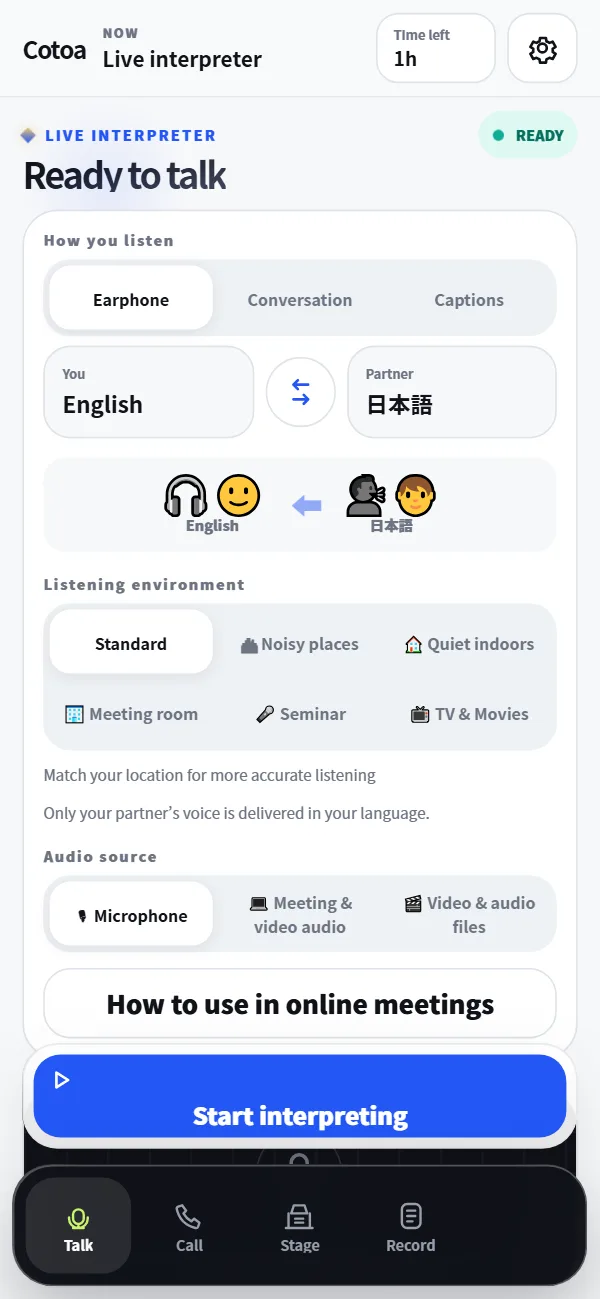
1 Reception desks, storefronts, and service countersSmooth face-to-face conversations
BEFORE
Someone speaks to you in a foreign language, and you cannot guide them clearly.
AFTER
Interpret on the spot. Both sides clearly understand the conversation.
See key points
- The other person does not need to register for the app
- Instantly switch between earphones, conversation, and subtitles
- Just place your smartphone between you and take turns speaking
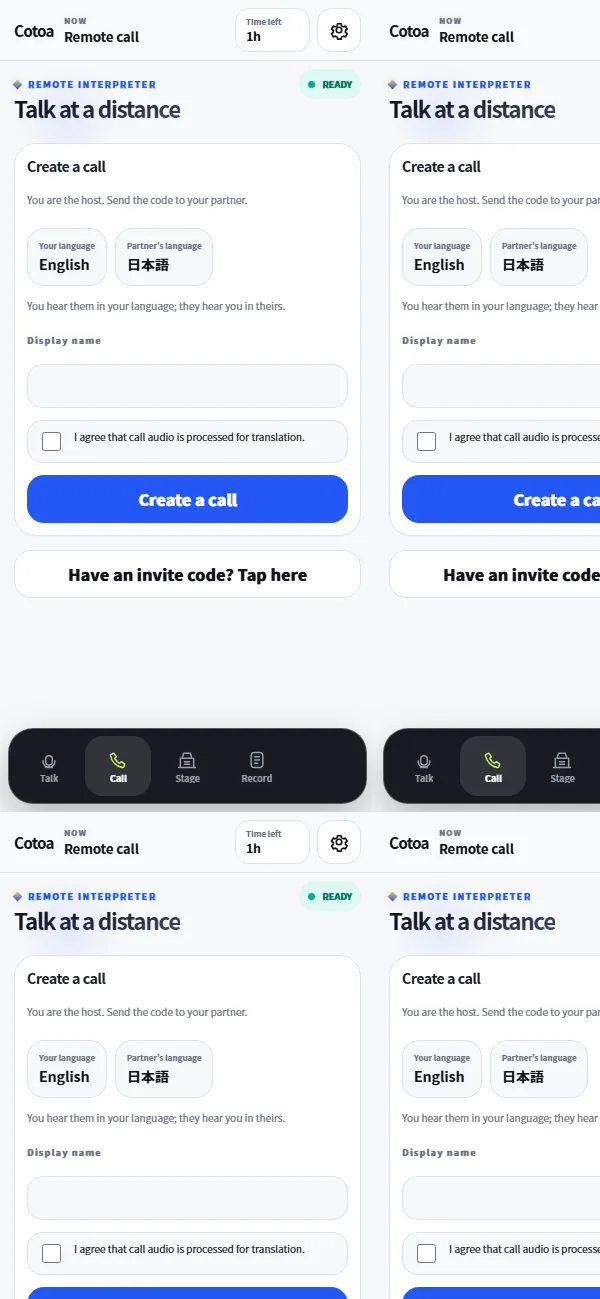
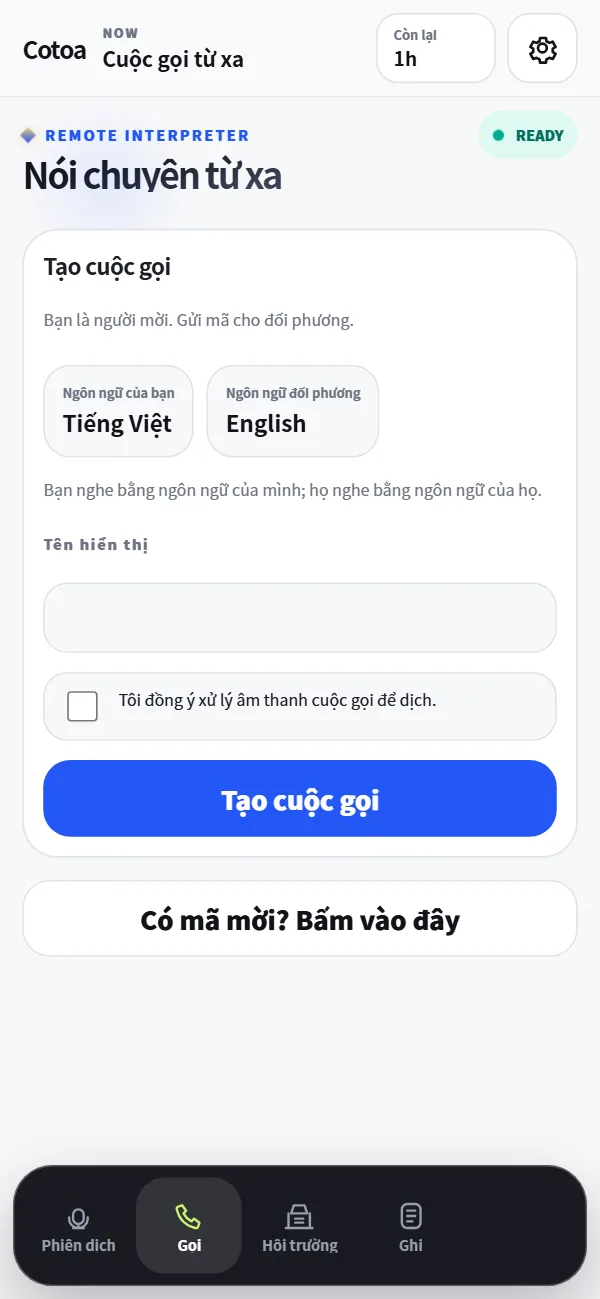
2 Translation-enabled calls with remote participantsConversations across any distance
BEFORE
You want to talk with someone far away, but cannot get across what you want to say.
AFTER
With translation-enabled calls, your message gets through even when you are apart.
See key points
- The other person needs no registration—join with one tap
- Simply send an invitation link via LINE or email
- Only the person sending the invitation uses time
3 Share your message in your own voiceCommunicate naturally in your own voice
BEFORE
You have something to say, but it is hard to express it in a way that feels like you.
AFTER
In your own voice, deliver your message naturally with translated audio.
See key points
- Register your voice with about 15 seconds of recording (voice cloning)
- Only your own voice can be registered
- You can also start right away with a standard voice
- Only your own voice can be registered. Registering someone else's voice or impersonating others is prohibited by the Terms of Service.
Remove “I don’t understand.”
Listen・read — understand what they’re saying
4 Hear clearly in online meetingsUnderstand meeting content with confidence
BEFORE
You cannot catch what overseas team members are saying, so meetings are easily interrupted.
AFTER
With translated audio and subtitles, you understand what the meeting is about.
See key points
- Keep using Zoom, Teams, and Meet as usual
- Works with videos and webinars too, as long as the sound plays on your PC
- You can also send your own speech into the meeting
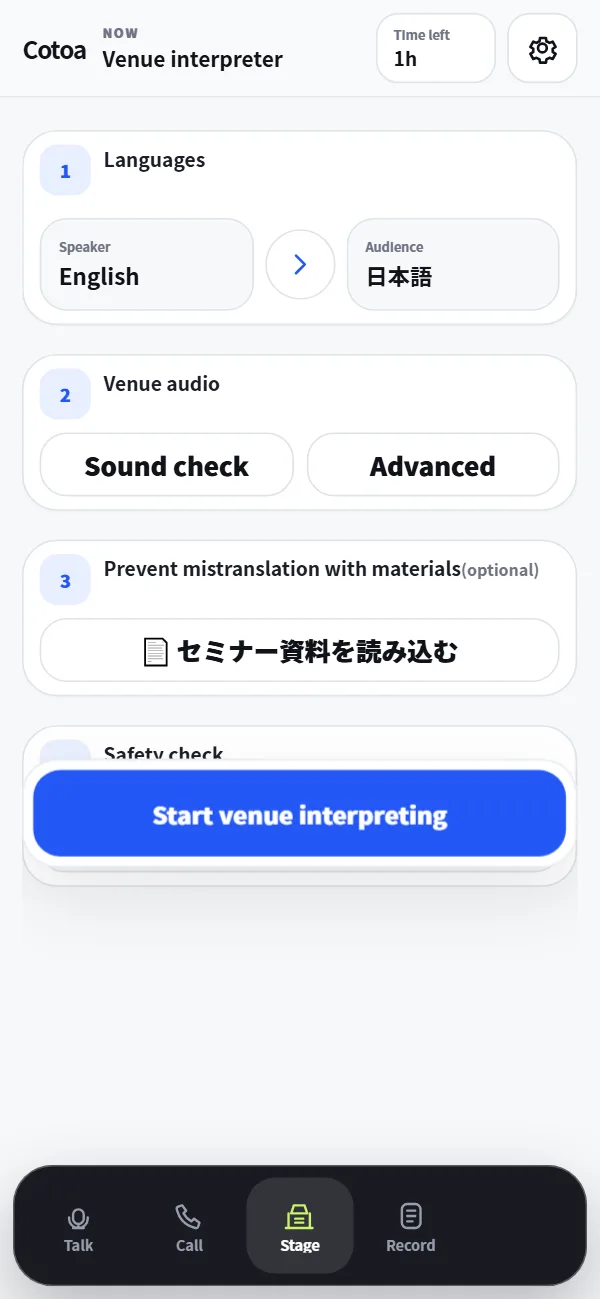
5 Broadcast interpretation at your venueEvents made easy
BEFORE
An overseas guest's message does not reach the audience, so valuable content is lost.
AFTER
Play the speaker’s message through the venue speakers in one selected translation language.
See key points
- Stream interpreted audio to venue speakers
- Sound checks and safety confirmation before the event
- An emergency mute button that is always visible
Keep the record.
Save — turn conversations straight into meeting minutes
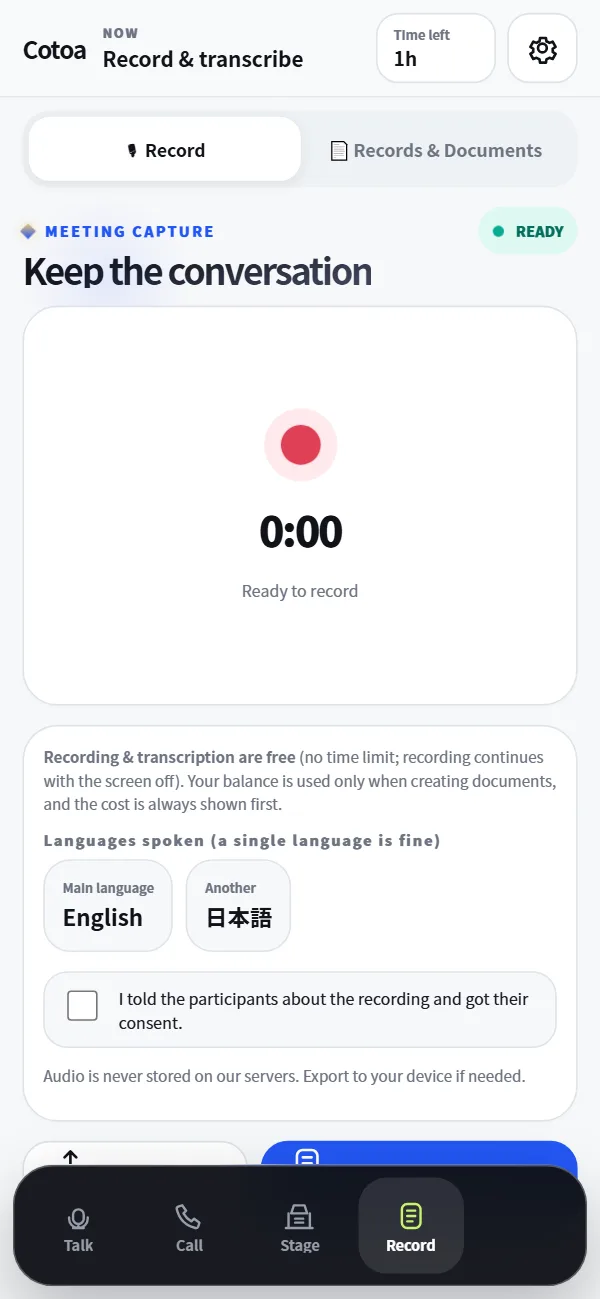
6 Record conversations and turn them into documentsEasy to organize later
BEFORE
After a meeting, it is difficult to organize what was decided.
AFTER
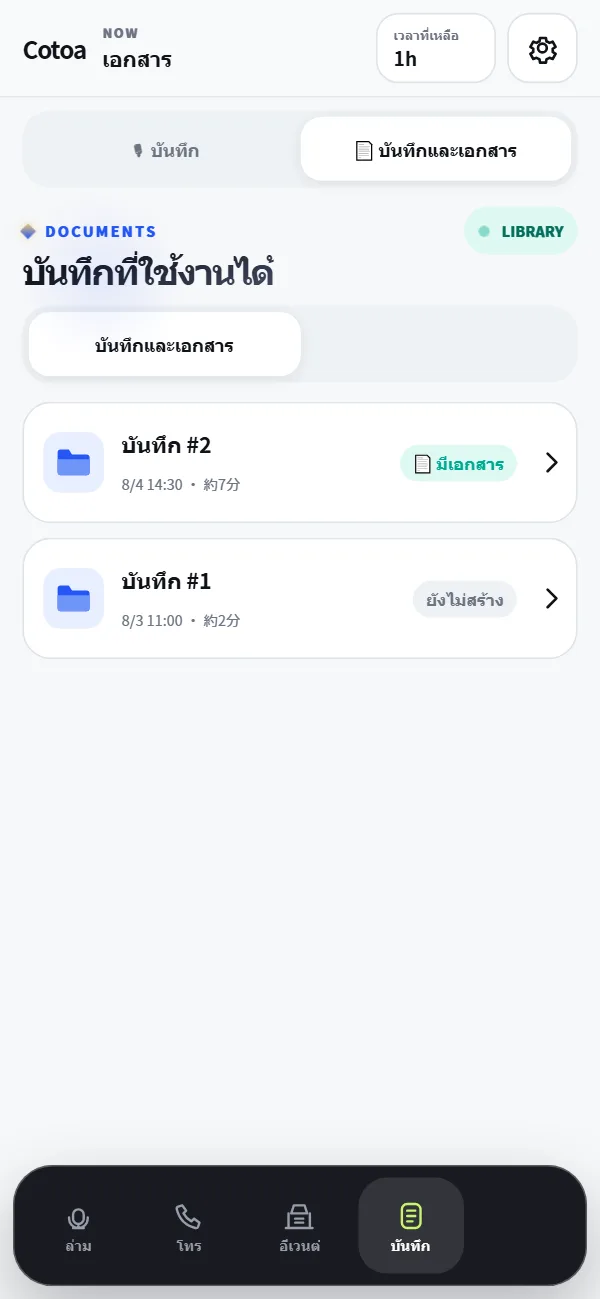
From recordings to summaries, reports, and meeting minutes, create everything in one place.
See key points
- Organize with folders by type and language
- Export and share in PDF / JPG images (paged) — export and share
- Generate in up to three languages while retaining the original text
- Works for Japanese-only meetings too (transcription and meeting minutes support a single language)
- Recording & transcription use 0.05 min of your time per minute recorded (about 3 min for a 1-hour meeting)
Cotoa Talk & Keep is more than a translation tool.
It removes language barriers, removes “I don’t understand,” and keeps the record.
It moves conversations and work forward.
🛡Strong securityConversation audio is not stored, and data is encrypted under a reliable management system.
🌐Cotoa language catalog13 low-latency voice · 5 standard voice · 54 captions · 2 experimental captions|74 total.
🕒Ready whenever you areNo installation needed. Start quickly in your browser.
👥Clear sign-up supportA fixed sign-in help bot and a direct path to Cotoa support are available.
No monthly fee. Pay only for what you use.
Your remaining time is always shown at the top of the screen. Add more only when you need it.
Free account
¥0Sign up (confirmed email / Google / verified-email Discord) for 5 free minutes
Daily beta slots get 5 min every month · No card required
5 / 15 / 30 min
¥280〜5 min ¥280 · 15 min ¥680
30 min ¥1,180 · add from the interpreting screen
For a quick business meeting
¥1,980Valid until all time is used
No expiration date
3 hours
¥5,400¥1,800 per hour
For 2–3 meetings
6 hours / 12 hours
¥9,900〜6 hours ¥1,650/h
12 hours ¥18,000(¥1,500/h)
Tax included, no subscription, no automatic billing, and purchased balance does not expire. One balance minute equals one standard interpretation minute. Captions 0.50x, calls 1.25x, cloned voice 1.50x, calls + clone 1.75x, recording/transcription 0.05x. Free time is added when you sign up with confirmed email, Google, or a Discord account with a verified email. During the beta campaign (through September 30, 2026), the first 15 accounts each day receive 5 free minutes every month (unused time rolls over up to 10 minutes; free-only accounts are limited to 5 minutes per interpreting session). During beta, registrations beyond the first-come quota receive 5 minutes once. Registrations from October 1, 2026 receive 2 minutes once.
Protecting what matters, before convenience.
Audio is processed for interpretation and is not permanently stored on our servers.
The recording feature cannot begin until participant consent has been confirmed.
Your browser receives connection details that can be used only for a short time.
We prohibit the use of third-party voices, impersonation, and use for fraudulent purposes.
Processing of audio, payments, and more is entrusted to OpenAI, Stripe, and ElevenLabs. Details on providing information to third parties located in foreign countries under the Act on the Protection of Personal Information are stated in our Privacy Policy.
Questions before you begin.
Do I need to install an app?+
No. You can use it through a supported browser on your smartphone or PC. Add it to your home screen to launch it like an app.
Does the other person need an account too?+
Not for face-to-face interpretation. For remote calls, the other person can also join as a guest through an invitation link.
How do I use it in online meetings?+
Open Cotoa Talk & Keep on your PC and select “Meeting/video audio.” When you share meeting audio from Zoom, Teams, Meet, or similar services, Cotoa Talk & Keep delivers that audio with subtitles and translated speech.
Can I use it completely offline?+
No. While you can add the screen to your home screen, AI interpretation, calls, and document generation require an internet connection.
Will I be charged automatically after the 5 free minutes?+
No automatic charges apply. Add usage time from within the app only when you need it.
Are conversation details saved?+
Real-time interpretation audio is not permanently stored on our servers. Only when you use the recording feature will transcription take place after confirming participant consent, and exported audio is saved on your device.
Can I use it for Japanese-only meetings?+
Yes. You can create records, transcriptions, meeting minutes, summaries, and reports directly from single-language conversations without translation.
Which languages are supported?+
Cotoa’s operating quality tiers are 13 low-latency translated-speech languages, 5 standard-voice languages, 54 caption languages, and 2 experimental-caption languages: 74 total. This is not a provider-published fixed language count. The interface supports 18 languages.
Start with 5 minutes.
Try it in a real conversation.
More than any explanation, trying the real thing is fastest. Create an account with confirmed email, Google, or a Discord account with a verified email, and your free time is added so you can go straight to the app.
🌐 cotoa-in.visone-ai.jp
- No credit card required
- Sign up for 5 free minutes
- Beta campaign through September 30, 2026 (first 15 accounts per day)
β First 15 accounts/day · 5 min every month
Start for free
Create an account with confirmed email, Google, or a Discord account with a verified email. Once confirmed, your free time is added.
By signing up, you are deemed to have agreed to the Terms of Use and Privacy Policy.
Your account has been created
Already have an account or seat key?
This seat key cannot be displayed again.
Open the app →